Brute Force Detection
Keycloak brute force detection locks an account, temporarily or permanently, after a number of failed logins against that one account. It is off by default. Turn it on, but know its limit: it counts failures per user, so attacks that try one password per account, such as credential stuffing and password spraying, never reach the threshold.
A brute force attack guesses many passwords against one account. Keycloak detects it and locks the account once the threshold of failed attempts is reached.
- Log in to the Keycloak Admin Console via the Phase Two Dashboard.
- Visit the realm you want to configure. Open the console link for the specific realm.
- Navigate to the Realm settings section in the left sidebar.
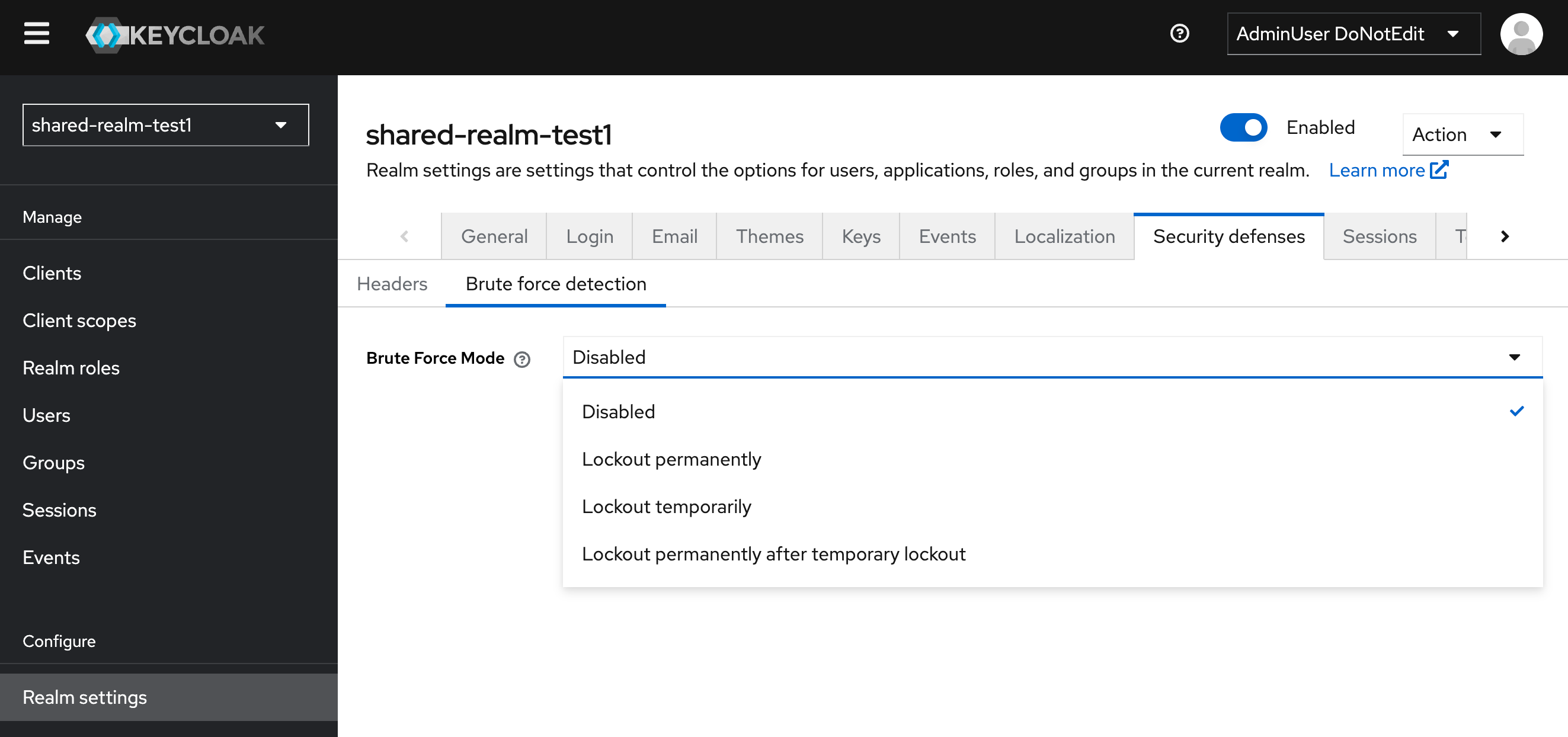
- Click on the Security defenses tab and then select the Brute Force Detection sub-tab.
- In the Brute Force Mode dropdown, select your desired mode:
- Disabled: No brute force detection is applied.
- Lockout permanently: User accounts will be permanently locked after the threshold of failed login attempts is reached.
- Lockout temporarily: User accounts will be temporarily locked for a specified duration after the threshold of failed login attempts is reached.
- Lockout permanently after temporary lockout: User accounts will be permanently locked after a temporary lockout period if the threshold is reached again.
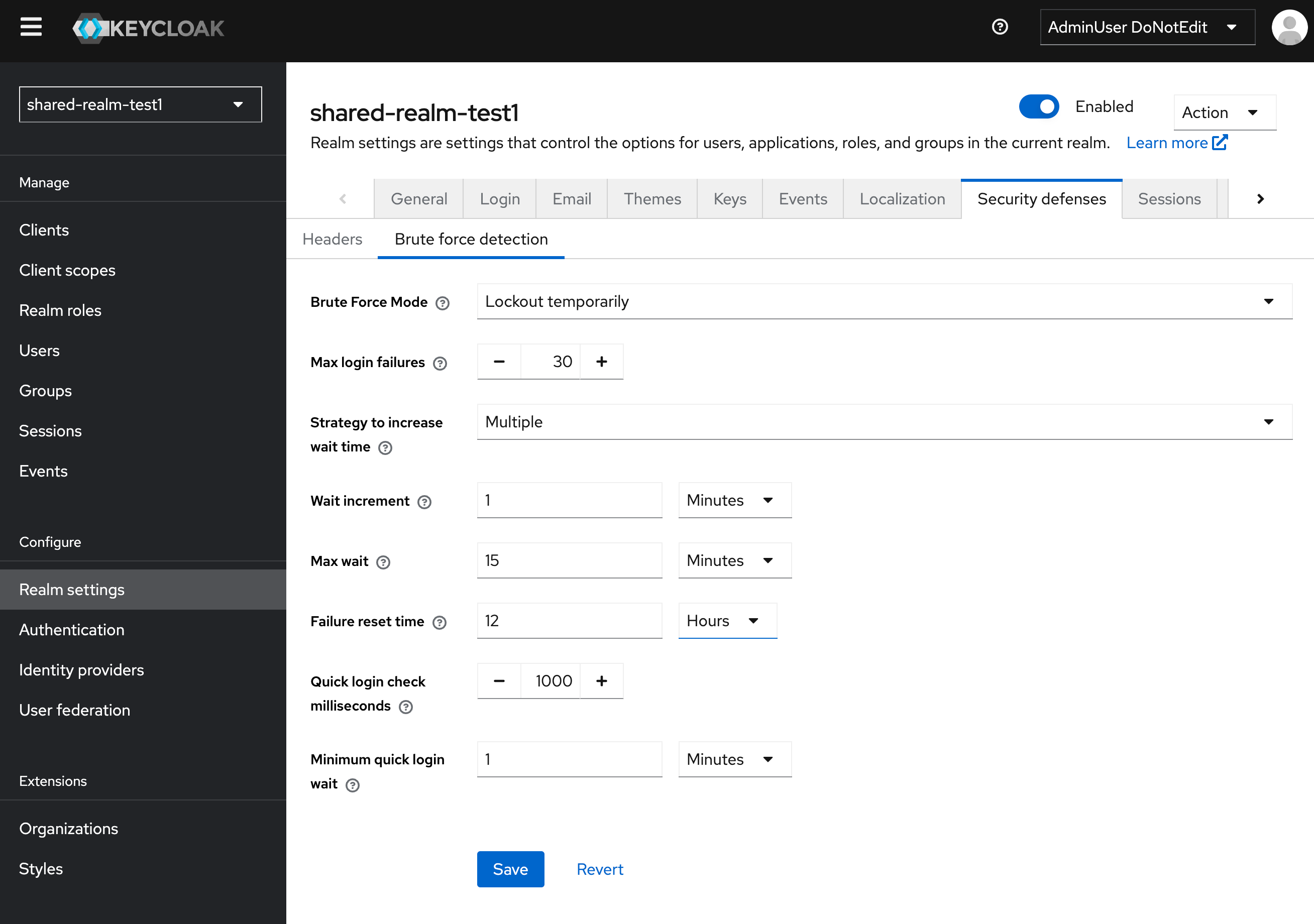
- Set your desired thresholds to be reached.
Considerations
Brute force detection is per user. It counts failed logins against one account at a time. It will not detect an attack spread across many accounts, and that is what credential stuffing is: an attacker replays username and password pairs leaked from other sites, usually trying one password per account, so most accounts never reach the threshold. Pair it with a CAPTCHA such as Cloudflare Turnstile on your login flows, Phase Two's rate limits at the edge, and the other measures in Credential Stuffing and Account Takeover.
It covers the token endpoint too. Failed logins through the direct access grant (grant_type=password) count toward the same per-user threshold as browser logins. That does not make the direct grant safe to leave on; see Sign-in Methods, Grant Types and Clients.
A lockout can be used against you. Anyone who knows a username can lock that account by sending wrong passwords. For an end user this is an inconvenience. For a shared account that a backend service logs in with using a password, it is an outage: the attacker locks the account and the service stops getting tokens. Give services their own service account with the client credentials grant instead, which brute force detection does not apply to.
Permanent lockout disables the user. A permanent lockout sets the account to disabled. In testing on Keycloak 26.8.1, clearing the user's brute force record did not unlock it; the user also had to be re-enabled. Temporary lockouts clear on their own. See Password Spraying and Brute Force for how the lockout timing behaves under repeated attempts.
Quick login check. Failures that arrive faster than the Quick Login Check Milliseconds setting trigger a short lockout for the Minimum Quick Login Wait, even before the main threshold is reached. This slows scripted attempts against a single account without affecting a person typing.
Record lockouts. If you save login events, add USER_DISABLED_BY_TEMPORARY_LOCKOUT and USER_DISABLED_BY_PERMANENT_LOCKOUT to the saved event types. Without them you can see that an account was locked but not when, or what triggered it. See Audit Logs.
For how brute force detection fits with the other defenses, see Securing Keycloak in production. If you need help with your edge protection or have specific security requirements, please contact support.